AI Meeting Preparation Assistant
Google Calendar
COMPANY OVERVIEW
Google Calendar is everywhere. Nearly everyone I know uses it — for work, personal life, or both. It's the backbone of how teams coordinate across Google Workspace.
But here's the thing: Calendar tells you when something is happening, not what it's actually about. You get a title, maybe a link, and that's it. I kept noticing that before any meeting, I'd spend 5-10 minutes scrambling through Gmail and Drive trying to remember what we discussed last time. That friction felt like a problem worth solving.
The core personas who rely heavily on Google Calendar include:
Knowledge Workers & Team Contributors
Employees who attend recurring meetings, syncs, and cross-functional discussions. Their primary need is to quickly understand the context of each meeting — relevant emails, documents, decisions, and action items — without manual searching.
Managers & Team Leads
Individuals responsible for running structured meetings, driving alignment, and ensuring follow-through. They need a reliable way to prepare agendas, surface past decisions, and assess the readiness of participants.
Executives & Decision Makers
Users with dense calendars who depend on fast, high-level summaries to stay informed. They often enter discussions with limited time and require concise, accurate context.
Everyone I talked to had the same workflow: check Calendar, jump to Gmail, search Drive, skim old notes, try to remember what was decided last time. Rinse and repeat for every meeting. It's a lot of tab-switching for something that should be simple.
I looked at competitors — Outlook, Calendly, Motion, Reclaim.ai — and while they're good at scheduling, none of them actually help you prepare. That gap felt significant.
So I started exploring: what if Calendar could pull together context for you? Summarize what happened last time, surface the right docs, remind you of open action items — all before you even click "Join."
Problem Space
PROBLEM IDENTIFICATION
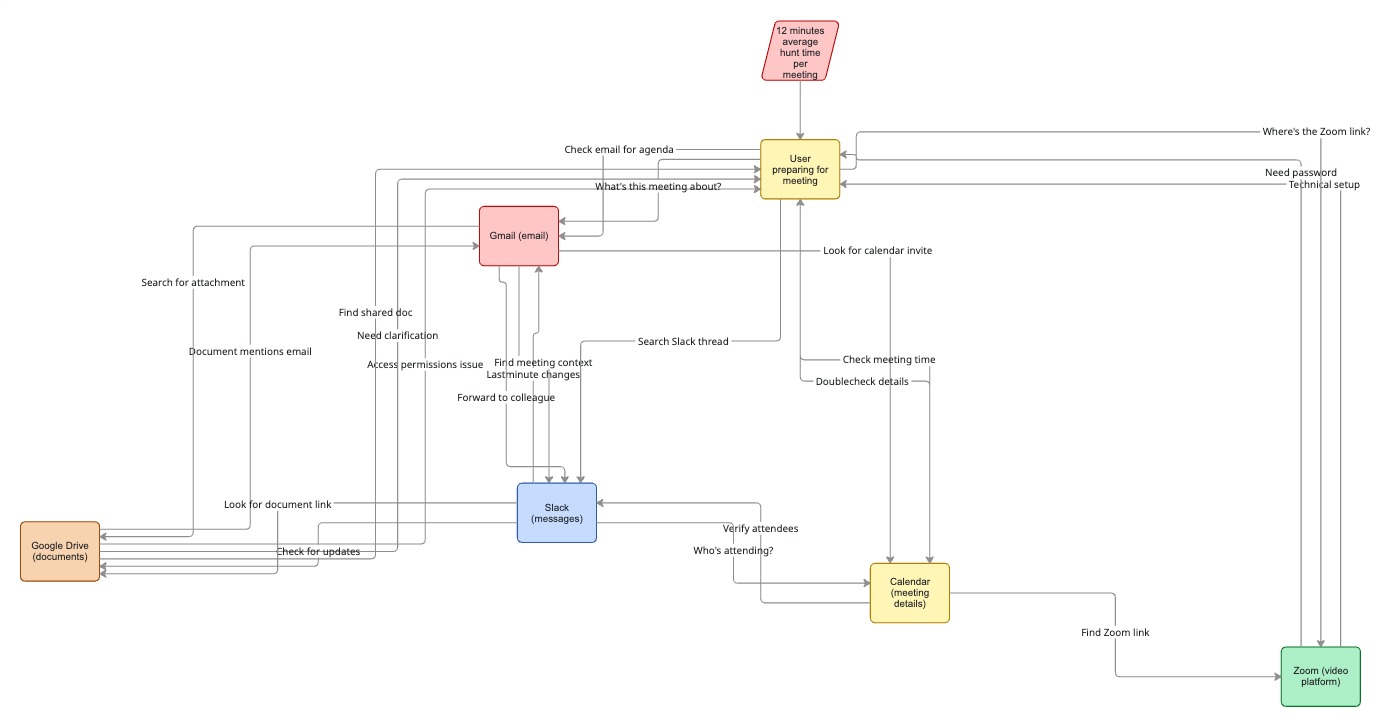
I started by looking at where the pain actually shows up. Calendar is great at scheduling — but when it comes to actually knowing what a meeting is about, you're on your own. People spend way too much time hunting for context.
Three things kept coming up:
1. Workspace Search Logs & Support Inquiries
Internal search data and user queries repeatedly reveal that users look for features like:
- "Meeting summaries"
- "Agenda templates"
- "Previous meeting recap"
- "Documents for this meeting"
- "Action items from last meeting"
These recurring searches indicate users expect Calendar to help them prepare — yet the product provides no such capability.
2. Context Fragmentation Across Apps
User interviews and observational research show that preparation behavior often looks like this:
- Jump into Gmail to find relevant threads
- Search Google Drive for Docs, Sheets, or Slides
- Skim notes from previous meetings
- Look for attachments from calendar invites
- Try to recall decisions made last time
This workflow is repeated before almost every meeting and leads to lost time, confusion, and inconsistent preparation.
3. Meeting Quality Scores Across Organizations
Teams report that meetings frequently start late, context must be re-established each time, and critical information is often missed.
A recent Google Workspace study showed that:
These signals pointed clearly toward a systemic preparation gap across Calendar users.
PRODUCT OPPORTUNITY
Meeting prep is something everyone does, but no tool actually helps with it. You do the same thing before every meeting — dig through emails, find the doc, remember what was said. It's tedious.
What if Calendar did that for you? Imagine opening an event and seeing:
- A quick summary of what happened last time
- The docs and emails that are actually relevant
- Action items that are still open
- A draft agenda you can edit or use as-is
That's the shift: Calendar goes from "when is the meeting?" to "here's what you need to know."
ADDITIONAL INSIGHTS
A few other things stood out as I dug deeper:
People are already asking for this
I found dozens of feature requests across Workspace forums and support channels — people asking for agenda templates, meeting recaps, ways to see "what happened last time." This wasn't a solution looking for a problem.
The prep time adds up
Most people I talked to estimated spending 5-15 minutes getting ready for each meeting. With 4-6 meetings a day, that's potentially an hour lost to context-gathering. Not huge per meeting, but it compounds.
No one else is doing this well
I checked Outlook, Motion, Reclaim, and a few others. They're focused on scheduling optimization — finding the best time, blocking focus hours. None of them actually help you show up prepared for the meeting itself.
The more I looked, the more it felt like a real gap — not just a nice-to-have, but something that would actually change how people experience their calendars.
Hypotheses
BUILDING AN INTELLIGENT MEETING PREP ASSISTANT
My bet was simple: if Calendar could pull context together automatically — summarizing what happened before, surfacing relevant docs, flagging open action items — people would actually feel prepared instead of scrambling. The goal wasn't to add more features, but to remove the friction that's already there.
INTRODUCING PRE-MEETING INTELLIGENCE INSIDE THE EVENT VIEW
I considered a few places this could live — a separate app, a sidebar, push notifications. But the event view made the most sense. That's where people already go when they want to know "what is this meeting?" It's the natural moment.
Starting there also meant:
- We could ship something useful without redesigning Calendar
- It's easy to test — did people use it? Did it help?
- If it worked, we could expand to notifications or Meet later
Talking to engineers confirmed it was technically doable — we could layer this on top of existing Calendar and Drive APIs without breaking anything. Low risk, clear signal.
EXPANSION POTENTIAL ACROSS THE WORKSPACE ECOSYSTEM
If the event view worked, the next steps were obvious: smart notifications before meetings, integration with Meet for in-meeting context, auto-generated follow-ups afterward. The whole workflow could feel connected.
But I didn't want to get ahead of myself. AI summaries can be wrong. Surfaced docs might be irrelevant. The first priority was making sure the basics worked reliably before pushing it everywhere.
These guardrails helped keep the scope focused: start small, prove value, then expand.
DESIGN EXPLORATIONS
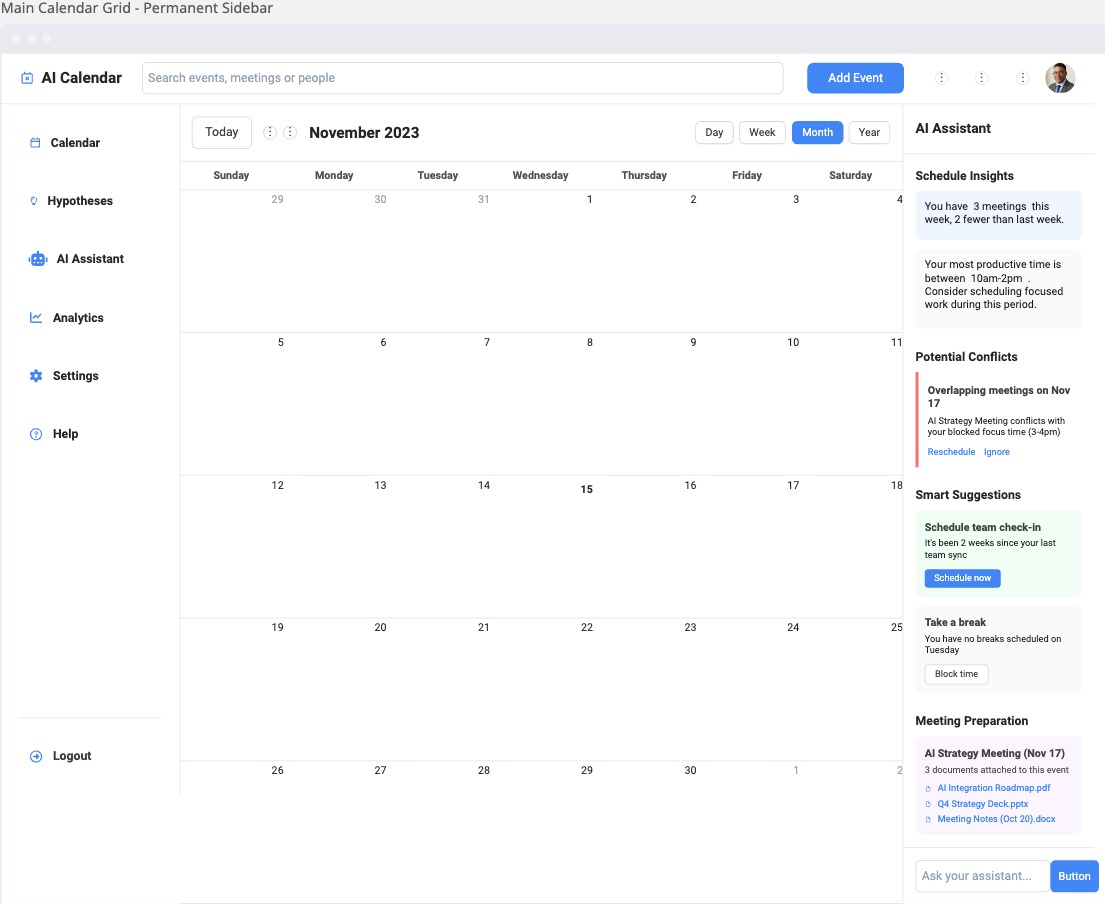
Permanent Sidebar — Always-visible context panel
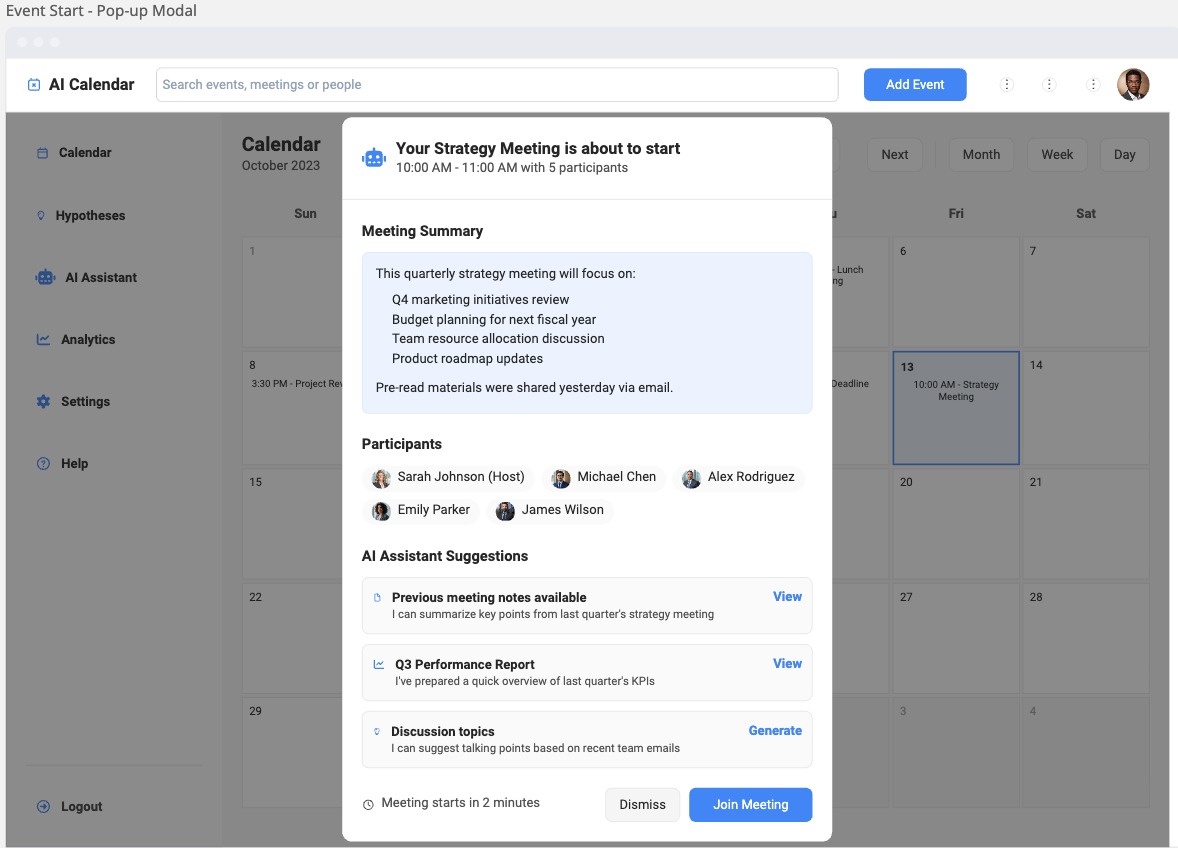
Pop-up Modal — Quick access without leaving the calendar view
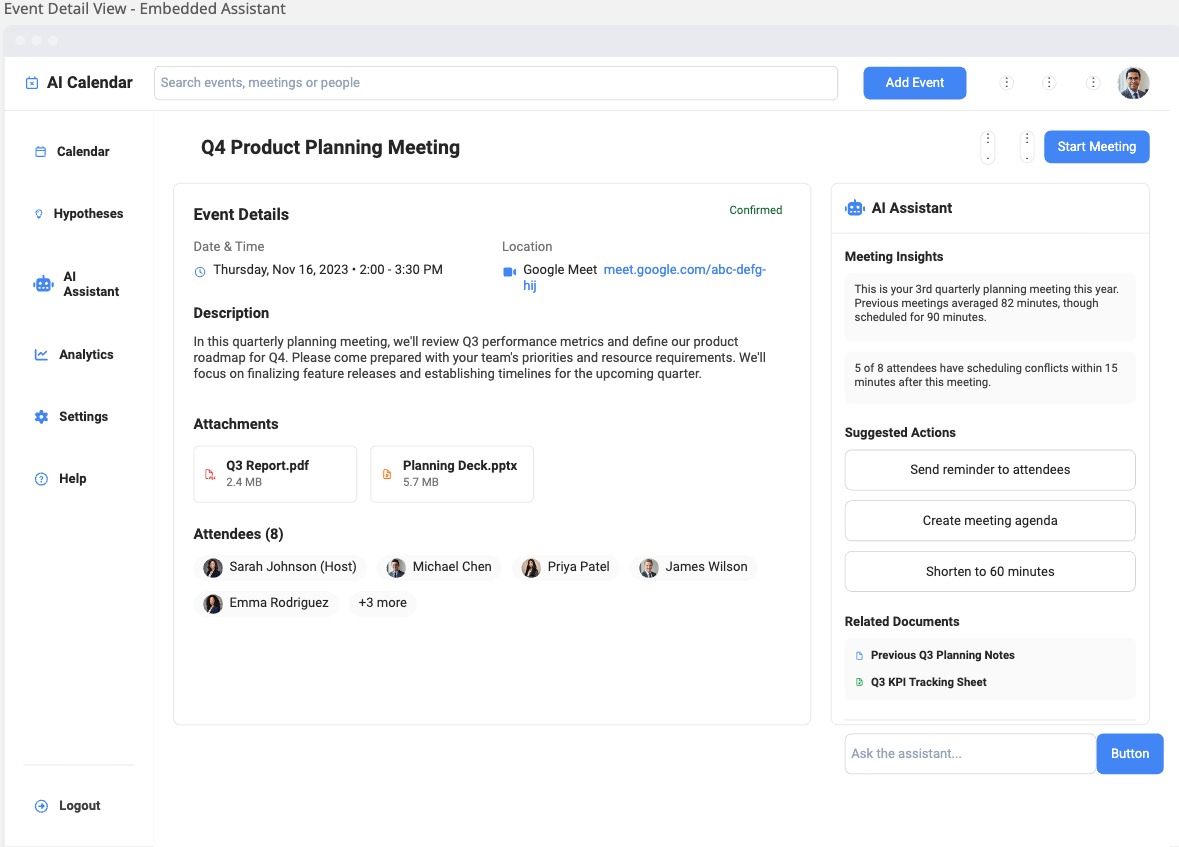
Embedded Assistant — Integrated directly within the event view
Solution Space
JOB STORIES
From interviews and watching how people actually prep for meetings, four use cases kept coming up. These became the foundation for what we'd build first.
I want to... quickly understand the most important context for an upcoming meeting
So that I can... enter the discussion prepared without searching across Gmail, Drive, and past notes.
Example: "Show me a concise summary of the last meeting's decisions, open questions, and top priorities for the next call."
I want to... automatically surface the documents and emails most relevant to a meeting
So that I can... review everything I need in one place instead of manually hunting for attachments or threads.
Example: "Pull up the design doc that was shared last week and the email thread where the final deadline was discussed."
I want to... extract action items and assigned owners from previous interactions
So that I can... ensure follow-through and accountability before entering the meeting.
Example: "Show me a list of tasks from last Thursday's sync, who owns them, and any overdue items I should bring up."
I want to... generate a structured agenda based on meeting history and shared documents
So that I can... run a more focused, organized meeting without starting the planning process from scratch.
Example: "Propose a draft agenda with sections for updates, decisions, blockers, and next steps."
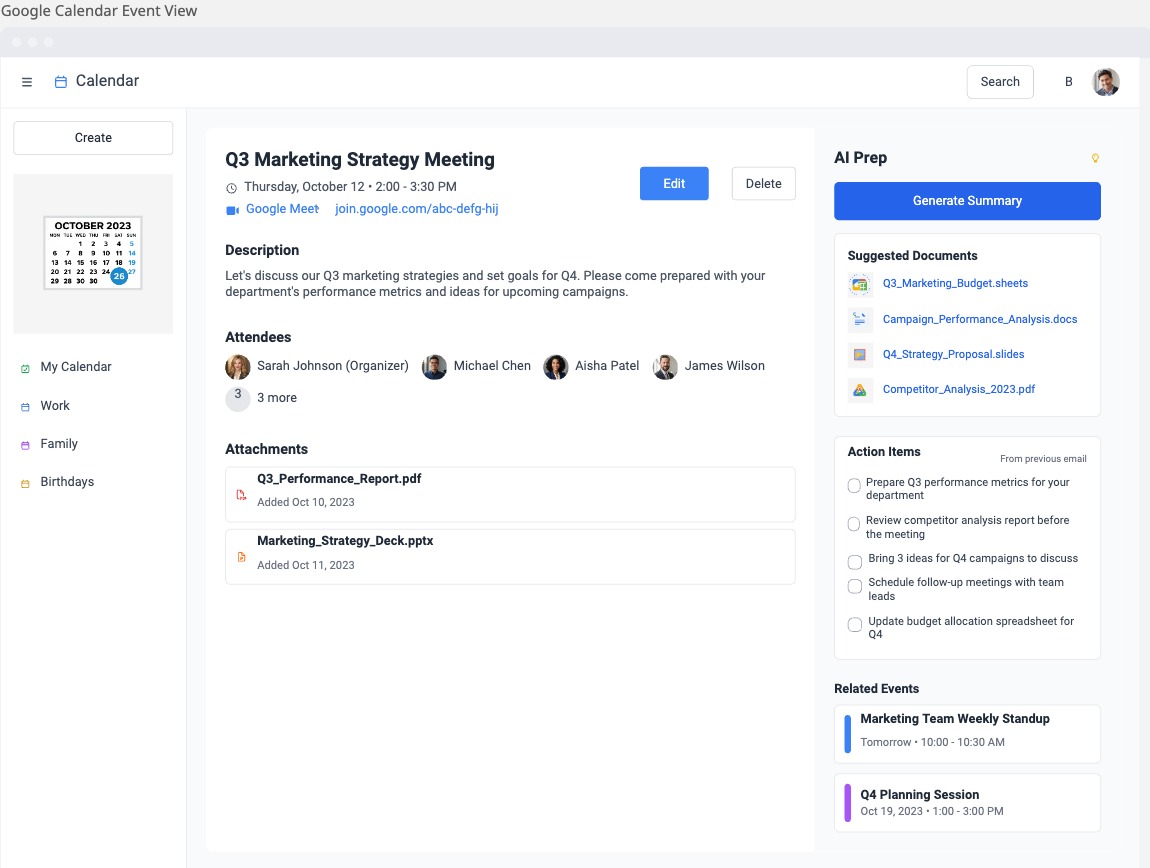
Event View — AI-powered meeting preparation context integrated directly into the calendar event
Core Features
1. CONTEXT SUMMARY
AI analyzes: Previous meeting notes, related emails, open items, and attached docs.
And generates: Key decisions, discussion history, open questions, and stakeholder responsibilities.
2. TASK & ACTION ITEM EXTRACTION
AI scans across: Emails, Docs, and Slides.
And extracts: Tasks, owners, due dates, and pending follow-ups.
Tasks integrate with Google Tasks or Workspace.
3. RELEVANT DOCUMENT & EMAIL SURFACING
Using semantic search, Calendar suggests:
- Docs shared before the meeting
- Past attachments
- Slide decks
- Key email threads
No more digging.
4. ONE-CLICK AGENDA BUILDER
Users can generate:
- Draft agenda
- Talking points
- Questions to review
- Suggested structure
Editable inside Calendar.
5. POST-MEETING FOLLOW-UP
After the meeting, AI generates a:
- Summary
- Task list
- Decision record
- Next-steps document
Metrics & Success Criteria
NORTH STAR METRIC
"Preparation Time Saved per Meeting"
Measured through:
- Reduction in time spent switching apps
- Time spent reviewing summaries vs searching manually
SUPPORTING KPIS
- Feature adoption (% of events using AI Prep)
- 7-day retention of feature
- Document open-through rate
- Pre-meeting summary engagement
- Task extraction usage
- Increase in meeting satisfaction (survey)
EXPERIMENTATION (A/B TEST)
Control: Standard Google Calendar
Variant: AI Prep panel
Measure: Engagement, task completion, pre-read compliance, and meeting outcomes.
Roadmap
V1 — CORE INTELLIGENCE (0–3 MONTHS)
- Pre-meeting summary
- Task extraction
- Related docs surfacing
- Draft agenda builder
V2 — TEAM WORKFLOWS (3–6 MONTHS)
- Meeting auto-notes
- Follow-up tasks
- Smart reminders
- Integration into Google Meet
V3 — AUTONOMOUS CALENDAR (6–12 MONTHS)
- Predictive agenda suggestions
- Meeting duplication detection
- Calendar optimization ("cancel unnecessary meetings")
- Cross-tool integrations (Slack, Notion, Asana)
Impact
If this works, people stop dreading the "what did we talk about last time?" scramble. They show up knowing what's happening, what's expected of them, and what was left unfinished.
For Google, it's a way to make Calendar indispensable — not just for scheduling, but for actually being ready. That's a different kind of product.
The shift is simple: Calendar stops being a list of times and starts being a tool that helps you do the meeting well.
Reflection
A few things stuck with me from this project:
Start with real behavior, not features. The best signal came from watching people actually prepare for meetings — the tab-switching, the frantic searching. That's where the insight was, not in a feature request list.
AI can be invisible. The goal wasn't to make people interact with an AI assistant. It was to make the context just... appear. The less "AI-feeling" it is, the better.
Scope creep is tempting. I had to resist the urge to design the whole system upfront. The event view was enough to test the idea. Everything else could wait.
This project shaped how I think about AI features in general: they should remove friction, not add a new thing to learn.